Service & Support Frequently Asked Questions
Results:
No questions found. Try another category or reset the filters.
What is a ductless mini-split system?
A ductless mini-split system is comprised of an indoor unit called the evaporator and an outdoor unit called the condensing unit. The evaporator is connected to the condensing unit by copper tubing and electrical wiring which is passed through a 2 ½" – 3" hole. Basically, it is a small central air unit with the flexibility of cooling or heating one room or more; zoning.
What are the advantages of installing an AIRSTAGE ductless mini-split over a central air system?
- With Central Air you must cool an entire home when only one room may need cooling. On the other hand, ductless mini-splits cool only the areas you want and not the areas you don't.
- 18,000 BTU is a typical minimum central air unit. With ductless mini-splits, you can use 7,000, 9,000 or 12,000 BTUs.
- Typical 3-ton homes are not zoned or require complex zoning systems, which makes it very expensive for the homeowner. With ductless mini-splits, multiple evaporators make zoning as simple as setting a remote control.
- Energy wasted in long lengths of uninhabited ductwork means higher energy bills. Less than 5% cooling loss occurs in insulated refrigerant lines compared with up to 25% through ducts.
- Retrofitting homes requires cutting holes in walls, floors, ceilings or decreasing closet space with ducts. Ductless mini-splits requires just a 3 or 4 diameter hole in the outside wall. Means less mess and better home aesthetics.
How long has AIRSTAGE been manufacturing ductless mini-splits?
For over 35 years GENERAL HVAC Solutions America, Inc. has been working hard to make the world a more comfortable place. We have produced and shipped millions of air conditioning systems throughout the world, making the hottest places cool and the coolest places more comfortable.
What color do AIRSTAGE's ductless mini-split systems come in?
Each AIRSTAGE ductless mini-split wall mount model is offered in one standard beige color. Alternate colors are available for select systems.
I want to cover-up the line sets running on the outside of my house. What can I do?
One of AIRSTAGE's Solution Partners is SlimDuct. They specialize in line set covers. For more information, please visit www.slimduct.com(opens in a new tab) or call toll-free 866-405-4051.
Can I paint the ductless mini-split unit?
AIRSTAGE doesn't recommend painting the evaporator. If for any reason a problem occurs with the unit in the future, the warranty will become null and void.
Where can I purchase an AIRSTAGE mini-split system? Can I purchase directly from AIRSTAGE?
A consumer can purchase a unit from an AIRSTAGE Contractor. A list of contractors can be found here(opens in a new tab). AIRSTAGE GENERAL HVAC Solutions America, Inc. only sells to distributors.
What are the prices of your mini-split systems?
To find out prices, please contact a local contractor. A list of contractors can be found here(opens in a new tab).
Can I purchase from an online dealer?
No, GENERAL HVAC Solutions America, Inc. doesn't recommend buying our units online. The warranty becomes null and void for online purchases. GENERAL HVAC Solutions America, Inc. has enforced a non-retail Internet Sales policy. GENERAL HVAC Solutions America, Inc.’s full line of AIRSTAGE ductless mini-split heating and cooling products specifically excludes products purchased through on-line retailers and resellers. GENERAL HVAC Solutions America, Inc. does not authorize online retail sales of any of its products. Our authorized distributors are able to operate password protected sites to sell AIRSTAGE products to qualified technicians.
What is the warranty?
AIRSTAGE units have different warranty terms. For details on warranty length and terms, please check the Warranty page for a full listing of models or refer to the warranty statement that came with your unit.
Who can I contact for technical assistance?
You can contact our service department for technical assistance either via email at
servicehvac@fujitsugeneral.com or toll-free at 866-952-8324.
Technical Support is available from 8AM to 8PM EST.
Can I install an AIRSTAGE mini-split myself?
No. Only an authorized certified HVAC contractor can install AIRSTAGE units.
How should I clean the plasma filter of an I.A.Q. system?
The plasma filter has a life span of 6 to 8 years and should be washed every 400 hours of use. The filter easily detaches to be washed with mild detergent. The filter is not dishwasher safe. An LED light on the indoor evaporator unit will notify you when it is time to clean the filter. If the light is ignored, the unit will automatically shut down after 100 additional hours of use until the filter is washed.
Do I need to clean the unit? If so, how?
Detailed instructions for maintenance can be found in each model's Owner's Manual.
What is SEER?
Seasonal Energy Efficiency Ratio; a measure of cooling efficiency for air conditioners and heat pumps. The higher the SEER, the more energy efficient the unit. Energy efficiency equates to lower electrical bills. Currently U.S. Government's minimum SEER rating is 13.
What is a BTU?
British Thermal Unit. Used to measure cooling or heating capacity; the amount of heat required to raise or lower the temperature of 1 lb of water 1°F.
Doesn't operate immediately:
- If the unit is stopped and then immediately started again, the compressor will not operate for about 3 minutes, in order to prevent fuse blowouts.
- Whenever power is interrupted, the protection circuit will prevent the unit from re-start for 3 minutes when power returns.
Noise is heard:
- During operation and immediately after stopping the unit, the sound of water flowing in the air conditioner's piping may be heard. Also, noise may be particularly noticeable for about 2-3 minutes after starting operation (sound of coolant flowing).
- During operation, a slight squeaking sound may be heard. This is the result of minute expansion and contraction of the front cover due to temperature changes.
- During Heating operation, a sizzling sound may be heard occasionally. This sound is produced by the Automatic Defrosting operation.
Smells:
- Some smells may be emitted from the indoor unit. This smell is the result of room smells (furniture, tobacco, etc.) which have been taken into the a/c.
Mist or steam are emitted:
- During Cooling or Dry operation, a thin mist may be seen emitted from the indoor unit. This results from the sudden cooling of room air by the air emitted from the a/c, resulting in condensation and misting.
- During Heating operation, the outdoor unit's fan may stop, and steam may be seen rising from the unit. This is due to Automatic Defrosting operation.
Airflow is weak or stops:
- When Heating operation is started, fan speed is temporarily very low, to allow internal parts to warm up.
- During Heating operation, if the room temperature rises above the thermostat setting, the outdoor unit will stop, and the indoor unit will operate at very low fan speed. If you wish to warm the room further, set the thermostat for a higher setting.
- During Heating operation, the unit will temporarily stop operating (between 7 and 15 minutes) as the Automatic Defrosting mode operates. During Automatic Defrosting operation, the OPERATION indicator lamp will flash.
- The fan may operate at very low speed during Dry operation or when the unit is monitoring the room's temperature.
- During SUPER QUIET operation, the fan will operate at very low speed.
- In the monitor AUTO operation, the fan will operate at very low speed.
Doesn't operate at all:
- Has there been a power failure?
- Has a fuse blown out, or a circuit breaker been tripped?
- Is the timer operating?
Poor Cooling or Heating performance:
- Is the air filter dirty?
- Is the air conditioner's intake grille or outlet port blocked?
- Did you adjust the room temperature settings (thermostat) correctly?
- Is there a window or door open?
- In the case of Cooling operation, is a window allowing bright sunlight to enter?
- In the case of Cooling operation, are there heating apparatus and computers inside the room, or are there too many people in the room?
- Is the unit set for SUPER QUIET operation?
The unit operates differently from the Remote Control Unit's setting:
- Are the Remote Control Unit's batteries dead?
- Are the Remote Control Unit's batteries loaded properly?
What is AIRSTAGE Mobile?
AIRSTAGE Mobile is the name of a mobile app that enables you to use your mobile device to operate your air conditioner and check its operation status away from the place where it is installed.
Is there a fee to use AIRSTAGE Mobile?
No. The AIRSTAGE Mobile is free to use. However, you are responsible for any Internet connection fees that you incur when downloading and using the app.
Can I use AIRSTAGE Mobile and a wired remote controller at the same time?
You can use AIRSTAGE Mobile and a wired remote controller that comes with the following units at the same time:
1) AIRSTAGE's indoor units with a built-in wireless LAN adapter
2) AIRSTAGE's indoor units connected with any of the following optional wireless LAN adapters
UTY-TFSXH3 / UTY-TFSXH4 / UTY-TFSXJ3 / UTY-TFSXJ4
What kind of wireless router can I use?
You can use a wireless router compatible with the IEEE802.11b/g/n wireless communication standard.
Click below to browse a list of compatible wireless routers.
What do I need to operate my air conditioner away from the place where it is installed?
You need to have the following items:
- An AIRSTAGE air conditioner equipped with Smartphone Link
- A wireless router compatible with the IEEE802.11b/g/n communication standard that uses the 2.4 GHz band from 1 to 13 channels
- The AIRSTAGE Mobile app installed in a mobile device running on Android 6.0 or later or on iOS 13.4 or later
Although the recommended frequency band is 2.4 GHz, is there any problem if my router also has a 5 GHz band?
There is no problem if 2.4 GHz is included in the frequency band of the specification of the router to be used.
However, when using AIRSTAGE Mobile, it is necessary to connect at 2.4 GHz.
For router setting change, please contact the manufacturer of the router you are using.
How do I know the frequency band of the router?
Check the router's instruction manual or website.
Do you have any plans to make it compatible with the 5 GHz band?
Operation not supported for now.
The router available from HP has been discontinued. Is it OK to use a comparable router as long as the specifications are the same?
No problem. Please access the url below, fill in necessary information and contact us.
Can I connect the wireless LAN adapter for AIRSTAGE Mobile with indoor units sold before 2022?
You can connect the wireless LAN adapter for AIRSTAGE Mobile with indoor units which can be connected to UTY-TFSXZ2/UTY-TFSXF1 wireless LAN adapters.
【Wireless LAN adapter compatibility】

Is AIRSTAGE Mobile operable on my Air conditioner (WLAN Adapter)?
AIRSTAGE Mobile is operable on the WLAN Adapters with the SSID starting with AP-WH*E or AP-WJ*E.
【Location of the SSID】
WLAN adapter built-in type
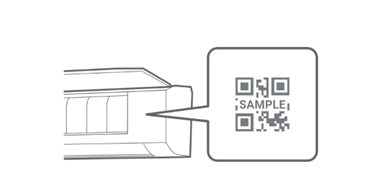
- Open the front panel of the air conditioner.
- SSID is listed on the body of air conditioner or the WLAN adapter installed in the air conditioner. (The position differs depending on model.)
Option type
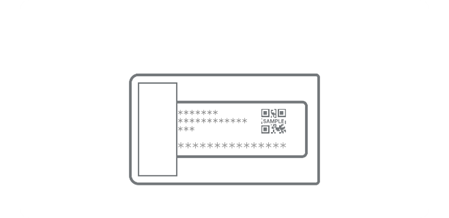
SSID is listed on the body of the WLAN adapter or the label included with the adapter.
DOWNLOAD for AIRSTAGE Mobile

For iOS

For Android
What does this app do?
This app enables you to use your mobile device to control your air conditioner and check its operation status away from the place where it is installed.
- To make it work, you must have an AIRSTAGE air conditioner equipped with Smartphone Link.
- You must have a mobile device in which to install the app.
- What you can control and monitor varies depending on the model of your air conditioner.
How many mobile devices can I use to operate an indoor unit?
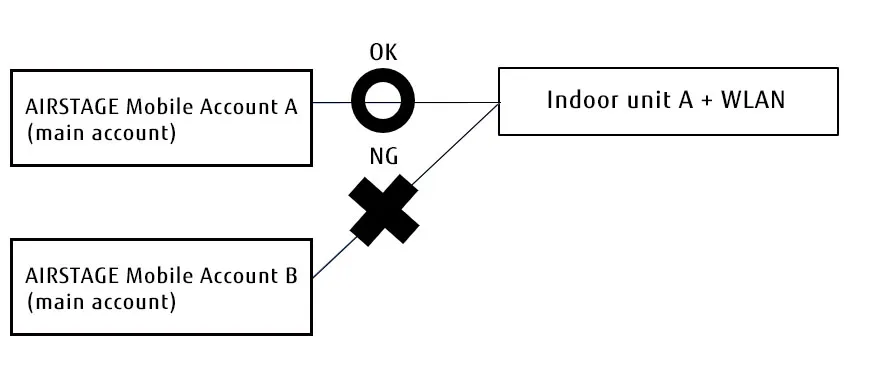
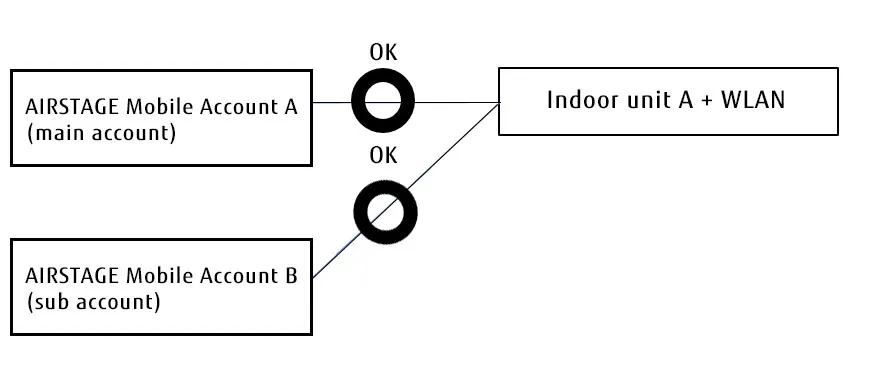
Only one account can be registered for one indoor unit.
However, by creating a sub-account, a single indoor unit can be operated/monitored by multiple mobile devices.
For details, please refer to the user's manual of the application.
How many indoor units can I operate with one mobile device?
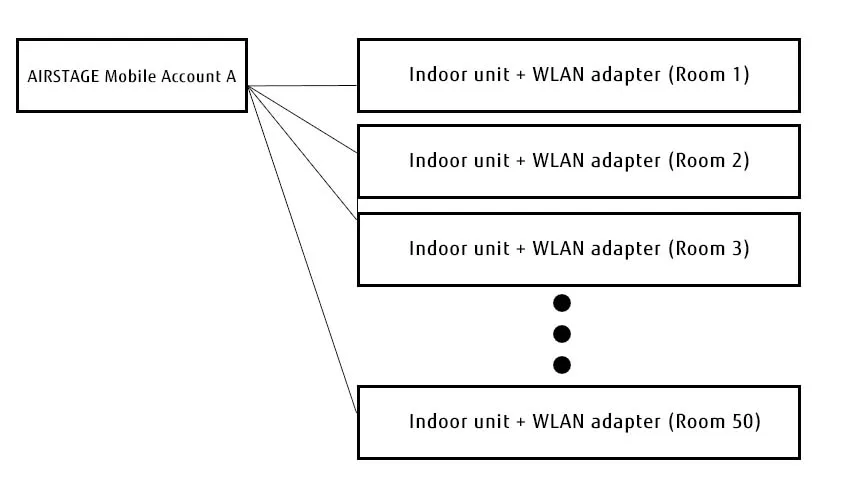
You can operate up to 50 indoor units per account.
Can I log in from multiple mobile devices using the same ID and password?
Yes, you can log in from multiple mobile devices using the same ID and password.
Can I register and use multiple IDs on one mobile device?
Yes, you can register and use multiple IDs on one mobile device. Open the User Settings from the menu and sign out when switching to another ID.
What is the wireless communication range?
The communication range varies depending on the structure and layout of a house as well as the performance of a WLAN router.
Check the device's instruction manual or the manufacturer's website for information about wireless communication range.
If you cannot find the answer, contact customer service of the device manufacturer.
Will the standby power of the main unit of my air conditioner increase when connected to an optional wireless adapter?
An optional wireless adapter constantly communicates with your air conditioner.
Therefore, the use of a wireless adapter will slightly increase the standby power consumption of your air conditioner.
When a wireless LAN adapter is in use, which takes priority, operation by a smartphone or operation by the remote controller that comes with an air conditioner?
You can use your smartphone and the remote controller interchangeably to operate the air conditioner. The last command, either from your smartphone or the remote controller, always executes.
Is there any difference in what the app can do depending on which version of OS a smartphone operates on?
There is no change or restriction on the function. However, the layout of the screen may change slightly.
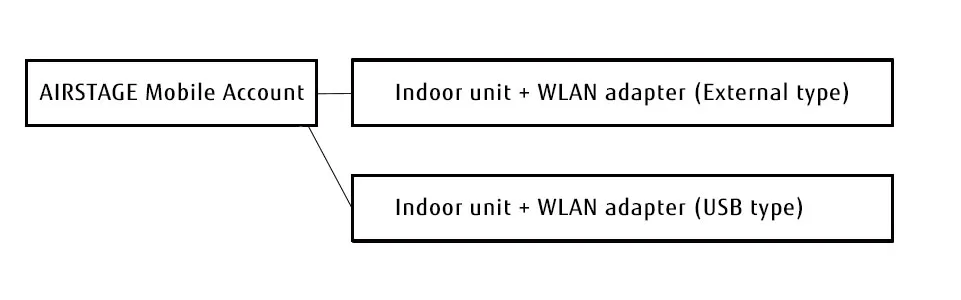
Can I operate an air conditioner with a built-in wireless LAN adapter and another one with an external adapter using the same app?
Yes it is possible.
External type, and USB type adapters can be registered for one account as shown below.
Are the user-specific settings of a registered air conditioner returned to SSID (factory settings) when initializing the adapter?
Yes, it will be reverted to the factory settings.
the name(IndoorUnitName) of Airconditioner can be Restore factory settings) by perfoming 1) initialzation of WLAN Addaptor, 2) delete the registration of the WLAN adapter with the App.
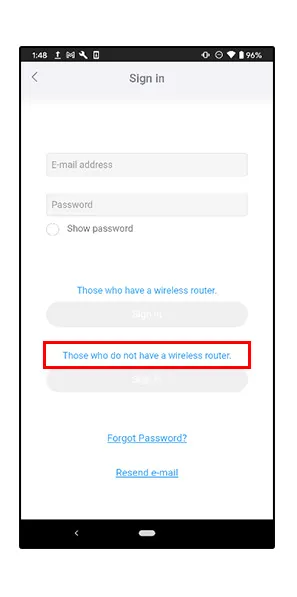
What does it mean when I see "Those who do not have a wireless router" on the login page?
Please select this option when logging in with Direct Control.
Direct Control is a connection method that does not require a router when there is no wireless LAN router in the home or when used in a room where wireless LAN communication is not stable.
However, there are some functions that are not available compared to a connection using a wireless LAN router (Cloud control).
Can I use phone calls or call-type applications (WhatsAPP, etc.) when using the app?
Phone calls are possible.
While using AIRSTAGE Mobile with Direct control, call-type applications cannot be used. (No pop-up display will be performed.)
How do I install the app?
Android
Search for AIRSTAGE Mobile on Google Play and install it on your device.
iOS
Search for AIRSTAGE Mobile in the App Store and install it on your device.
How can I start using wireless LAN?
You need to have the following:
Items you need:
- An AIRSTAGE air conditioner equipped with Smartphone Link
- A wireless router compatible with the IEEE802.11b/g/n wireless communication standard that uses the 2.4 GHz band from 1 to 13 channels
- The AIRSTAGE Mobile® app
- A mobile device running on Android 6.0 or later or on iOS 13.4 or later
Setup of wireless connectivity:
- Create a user account with the mobile app.
- Set up a wireless LAN connection.
(Set up the connection between an air conditioner and a router and the connection between an air conditioner and the mobile app)
I want to replace my wireless router with a new one.
To replace the connected wireless router with another one, complete the following steps:
1. Delete the device registration of the current wireless adapter on the app.
How to unregister a wireless LAN adapter
2. Initialize the current wireless adapter.
How to initialize a wireless LAN adapter
3. Perform pairing with a new router.
How do I initialize the wireless function of my air conditioner to its original settings?
Before discarding a wireless adapter or giving it to someone else, be sure to initialize it to its original settings to prevent the air conditioner from malfunctioning.
Before initializing a wireless adapter for an air conditioner registered with AIRSTAGE Mobile®, delete the registered air conditioner from the app first.
1. Delete the device registration of the current wireless adapter on the app.
How to unregister a wireless LAN adapter
2. Initialize the current wireless adapter.
What should I do when I buy a new mobile device to replace the old one?
Install AIRSTAGE Mobile on your new device.
Use the same login ID and password that you used on your old device.
What should I do if I change my e-mail address?
1. Unregister the air conditioner by using your old account.
2. Initialize the adapter
3. Delete your old account.
4. Create a new account with a new e-mail address.
5. Re-register the adapter under the new account.
How soon can I get an e-mail notification when creating an account?
Notification mail will be sent within 1 hours.
You will receive an email from * invitation-airstagecloud@generalww.com address.
Please access the URL of mail within 5 days after receiving mail.
When you access the URL, the account creation is completed.
If the mail does not arrive or can not be confirmed, the following cases are conceivable.
① It is treated as spam and blocked.
② There is an error in the e-mail address you have entered
If you can not find the mail after checking ①, sorry to trouble you, tap ”Resend e-mail” on the application login screen, Please enter your e-mail address and confirm the e-mail again.
How long is a notification e-mail valid when creating an account?
Notification mail will be sent within 1 hours.
You will receive an email from * invitation-airstagecloud@generalww.com address.
Please access the URL of mail within 5 days after receiving mail.
When you access the URL, the account creation is completed.
If the mail does not arrive or can not be confirmed, the following cases are conceivable.
① It is treated as spam and blocked.
② There is an error in the e-mail address you have entered
If you can not find the mail after checking ①, sorry to trouble you, tap ”Resend e-mail” on the application login screen, Please enter your e-mail address and confirm the e-mail again.
Is there a password restriction when creating an account?
The password policy is at least 8 characters including at least 3 of the following 4 types of characters: a lower-case letter, an upper-case letter, a number, a special character (such as !@#$%^&*).
How long does it take for the password reset e-mail to be delivered?
After the procedure, it will be sent to the registered e-mail address within 1 hours. Please access the URL posted in the email and change the password.
How long does it take to complete a connection setup?
Specifications of customers environment, routers, smart phones, etc., button mode, manual mode etc.It depends on the connection setting difference.
If you can not connect in button mode or manual mode, please enter the necessary information from the following URL and contact us.

When I delete my account, will connection information and information about the registered device be deleted?
Information on smartphones and routers registered as adapters by deletion of account is deleted, so there is no problem.
However, the wireless adapter remains connected to the router, so please initialize the current wireless adapter.
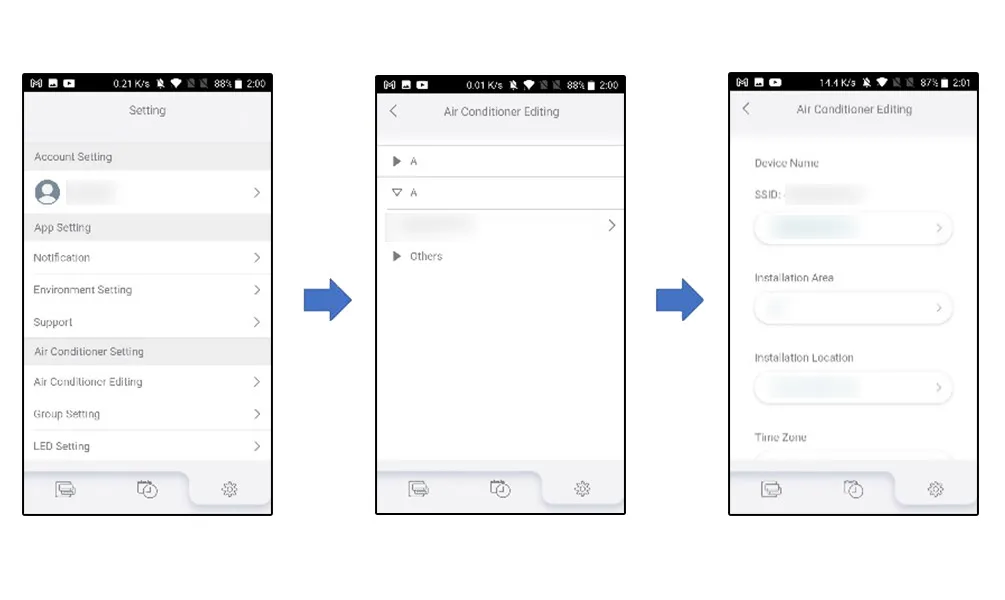
How can I change the indoor unit name?
- Start AIRSTAGE Mobile® and select the Setting button at the bottom right.
- Select Air conditioner editing of the Air conditioner Setting.
- Select the indoor unit name you want to change.
Is there any limit on the number of alphanumeric characters to be used to rename the indoor unit name?
It is limited to 20 characters. Spaces are also counted.
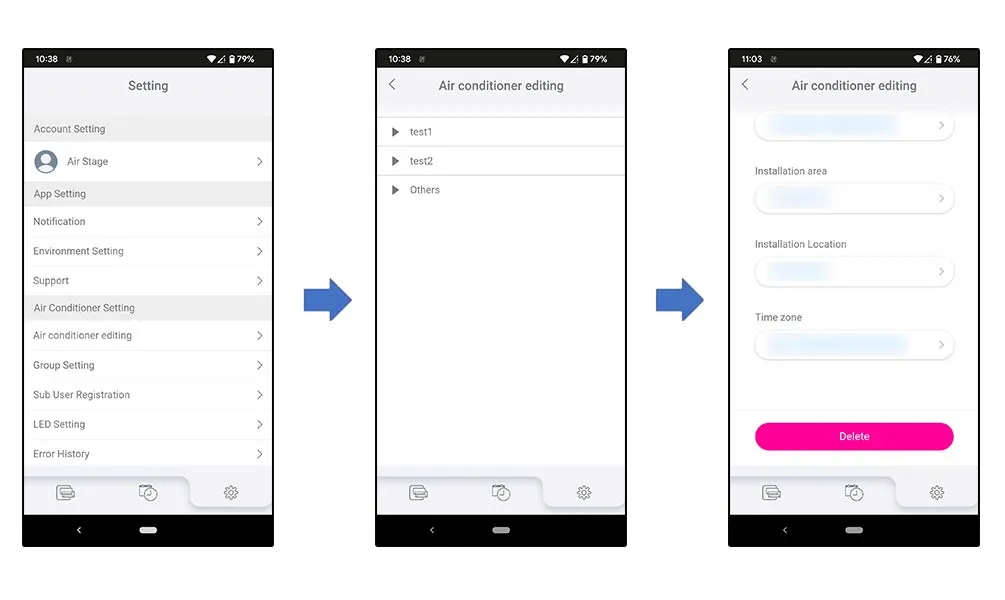
How to unregister a wireless LAN adapter
- Log in to the AIRSTAGE Mobile® app and tap the Setting button at the bottom right on the screen.
- Select Air conditioner editing of the Air conditioner Setting.
- Select the indoor unit name to be unregistered.
- Tap the Delete button.
How to initialize a wireless LAN adapter
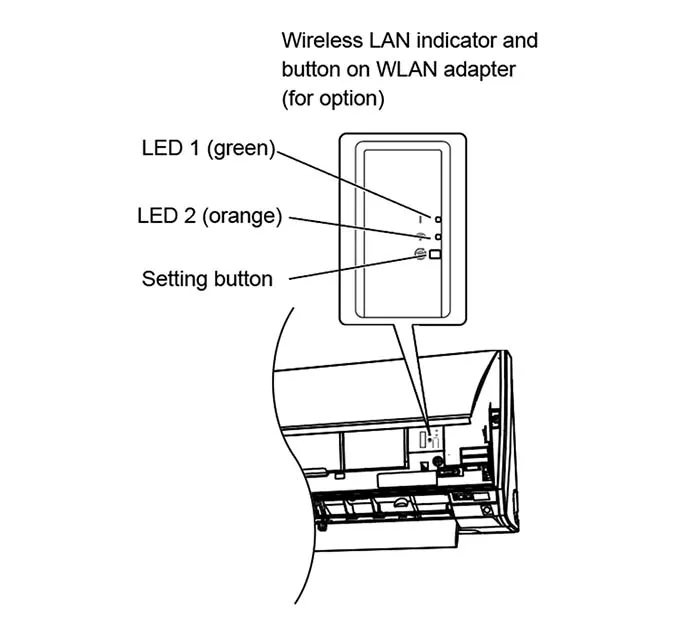
External types
1. Press and hold the Setting button for 12 seconds.
2. When the initialization starts, both LED 1 and LED 2 will flash(flashing on and off at 0.5-second intervals).
3.LED lamp will return to their original lighting patterns (LED 1: on; LED 2: off).
USB types
The initialization procedure varies depending on the remote controller type.
* For models without a wireless remote controller, check the initialization procedure in the operation manual of air conditioner.
RC type1
RC type2
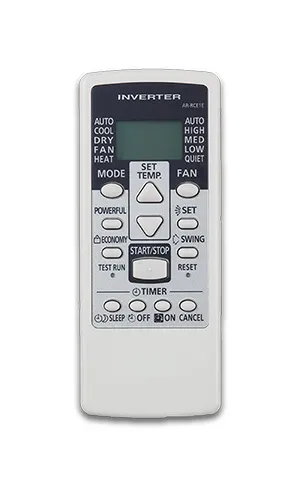
RC type3
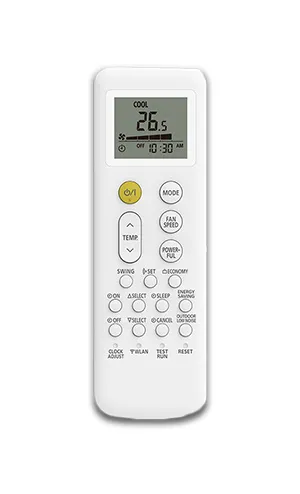
RC type4
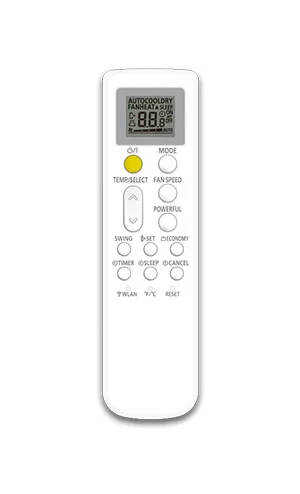
RC type5
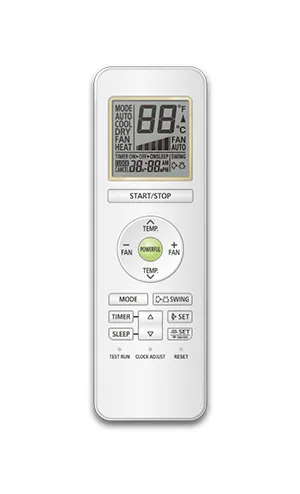
RC type6
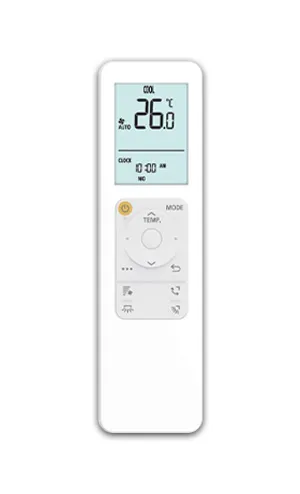
For Remote Controller type 1
- Press [ … ] button.
- Press [∧∨/◁▷] button to select the item that contains
 , then press [ ○ ] button.
- Press [∧∨] button to select , then press [ ○ ] button.
- Press [◁▷] button to select SETTING, then press [ ○ ] button.
- Press [∧∨/◁▷] button to select , then press and hold [ ○ ] for more than 5 seconds. “ ” indicator on the indoor unit will turn off after blinking fast.
 , then press [ ○ ] button.
 , then press and hold [ ○ ] for more than 5 seconds. “
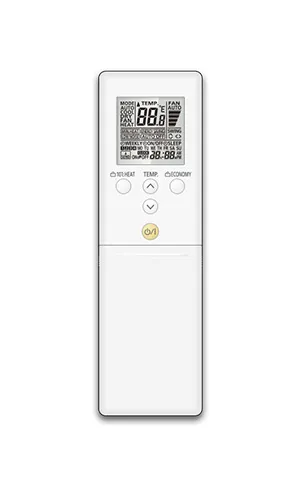
For Remote Controller type 2
- Press and hold the SEND or OFF (TIMER) button on the remote controller for more than 5 seconds.
- "Ln" and "1" will appear on the remote controller's screen.
- Select "2" using the TEMP button on the remote controller.
- Press the O/I button on the remote controller.
- "1n" will appear on the remote controller's screen.
- Press the O/I button on the remote controller. When the adapter initialization starts, the "WLAN" indicator lamp begins to blink. When initialization completes, the "WLAN" indicator goes off.
For Remote Controller type 3
- Press and hold the ON (Timer) button on the remote controller for more than 5 seconds.
- "L2" will appear on the remote controller's screen.
- Press the START/STOP button on the remote controller.
- "1n" will appear on the remote controller's screen.
- Press the START/STOP button again. When the adapter initialization starts, the "WLAN" indicator lamp begins to blink. When initialization completes, the "WLAN" indicator goes off.
For Remote Controller type 4
- Press the WLAN button on the remote controller 3 times.
- "L3" will appear on the remote controller's screen.
- Press and hold the O/I button on the remote controller for more than 5 seconds. When the adapter initialization starts, the "WLAN" indicator lamp begins to blink. When initialization completes, the "WLAN" indicator goes off.
For Remote Controller type 5
- Press the WLAN button on the remote controller 3 times.
- "L3" will appear on the remote controller's screen.
- Press the O/I button on the remote controller .
- "1n" will appear on the remote controller's screen.
- Press and hold the O/I button on the remote controller for more than 5 seconds. When the adapter initialization starts, the "WLAN" indicator lamp begins to blink. When initialization completes, the "WLAN" indicator goes off.
For Remote Controller type 6
- Press and hold the TIMER button on the remote controller for more than 5 seconds.
- "Ln" and "1" will appear on the remote controller's screen.
- Select "2" using the TEMP button on the remote controller.
- Press the START/STOP button on the remote controller.
- "1n" will appear on the remote controller's screen.
- Press the START/STOP button on the remote controller. When the adapter initialization starts, the "WLAN" indicator lamp begins to blink. When initialization completes, the "WLAN" indicator goes off.
I did not receive a notification e-mail when creating an account.
Notification mail will be sent within 1 hours.
You will receive an email from * invitation-airstagecloud@generalww.com address.
Please access the URL of mail within 5 days after receiving mail.
When you access the URL, the account creation is completed.
If the mail does not arrive or can not be confirmed, the following cases are conceivable.
① It is treated as spam and blocked.
② There is an error in the e-mail address you have entered
If you can not find the mail after checking ①, sorry to trouble you, tap ”Resend e-mail” on the application login screen, Please enter your e-mail address and confirm the e-mail again.
Can you resend a notification e-mail when creating an account?
Notification mail will be sent within 1 hours.
You will receive an email from * invitation-airstagecloud@generalww.com address.
Please access the URL of mail within 5 days after receiving mail.
When you access the URL, the account creation is completed.
If the mail does not arrive or can not be confirmed, the following cases are conceivable.
① It is treated as spam and blocked.
② There is an error in the e-mail address you have entered
If you can not find the mail after checking ①, sorry to trouble you, tap ”Resend e-mail” on the application login screen, Please enter your e-mail address and confirm the e-mail again.
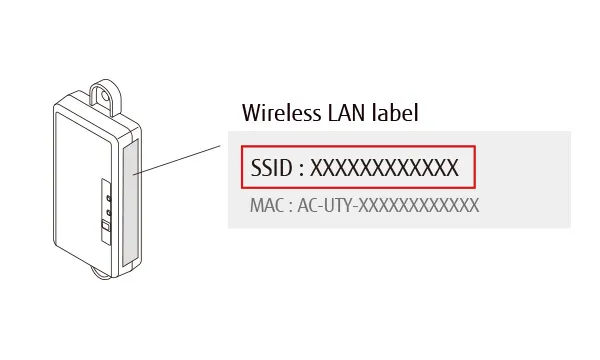
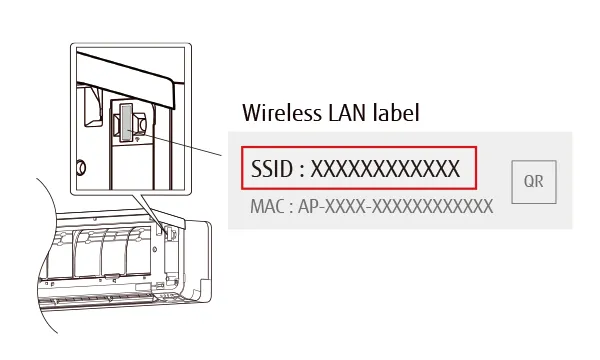
What should I do if I forget my username?
If you don't know the email address you used to create your account, check your SSID, Please contact us using the inquiry form below.
How to check SSID
External type
USB type
I cannot make a connection in button mode or in manual mode setting.
Please check the following.
- Whether the air conditioner and the smartphone are on the same network
- Air conditioner power reset
- Initialization of adapter
Sorry for your inconvenience, but please contact us by entering the necessary information from the following URL (transition to the posting format).
Can I restore my account after deleting it?
Can not. Sorry to trouble you, but please create your account again.
How can I connect if there is no WPS button?
If there is no WPS button, please register in manual mode.
Connection failed while operating in button mode. When trying to reconnect in button mode, is it OK to press the WPS button again?
If it fails you need to push the button again to connect.
Where can I get a manual for the app?
Click the following link.
Where can I get the app?
Android
Search for AIRSTAGE Mobile® on Google Play and install it on your device.
iOS
Search for AIRSTAGE Mobile® on the App Store and install it on your device.